/eh/2025-01-08/173633966714069467/picture.png)

/eh/2024-12-24/173503345348979036/Favorite-Icon.png)
/eh/2025-07-08/1751962110204480194/picture.png)
/eh/2025-06-21/1750485478958537574/countryInfoIcon.png)
/eh/2025-06-21/1750485741321434291/Hi-Sign-in-My-Nihao.png)
/eh/2025-06-21/1750485837193896318/cart.png)
/eh/2025-06-21/1750485968202533847/cart.png)
/eh/2025-04-17/1744862476612819675/hot-img.png)
/eh/2025-11-07/1762504524550532584/header-icon.jpg)
/eh/2025-07-07/1751875582852206790/header-icon.png)
/eh/2025-07-07/1751875587886277738/header-icon.png)

Best in 7 days


Shopping security
Introducing the HKM-184403 Wireless Remote Control Switch, an innovative solution designed to enhance the convenience of managing various electrical systems. This versatile switch features a powerful receiver compatible with DC24V systems, making it ideal for a wide range of applications including lamps, curtains, lifting equipment, barriers, and elevators.
The HKM-184403 comes with five transmitters which allow seamless control over multiple devices, providing you the flexibility to operate different systems from a distance. Its stable and reliable performance ensures that you stay in command of your environment whether you're at home or in a more complex setting.
Key technical parameters include:
- Working voltage: DC24V, ensuring efficiency and compatibility with various devices
- Quiescent current: 8mA, resulting in minimal power consumption
- Load power: 240W, providing ample capacity for multiple devices
- Receiving sensitivity: -105dbm, which enhances the signal range and reliability
- Frequency deviation: ±0.2MHZ, ensuring stable communications
Installation and operation of the HKM-184403 are straightforward thanks to its intuitive learning methods. It supports different working modes such as jog, self-locking, interlocking, and delay, allowing you to customize your setup according to your needs. Each coding method is user-friendly, ensuring that you can quickly set up and manage your devices with confidence.
When you choose the HKM-184403, you are investing in a high-quality product designed to streamline your daily activities while providing robust functionality. Please note that there is no manual included with your purchase, so keep this in mind when considering your order.
Elevate your control over various electronic systems today with the HKM-184403 Wireless Remote Control Switch. It's a remarkable tool for anyone looking to simplify their home or business environment.
Reminder: There is no manual when shipping, please consider it before buying.
The wireless remote control switch can control all kinds of lamps, curtains, lifting equipment, barriers, elevators and other fields. It is a new type of intelligent switch that can control one or more lamps and equipment in the room, with stable and reliable performance.
technical parameter
Working voltage: DC24V
Quiescent current: 8mA
Load power: 240W
Receiving sensitivity: -105dbm
Frequency deviation: ±0.2MHZ
Coding method: learning type
Working mode: Jog, self-locking, interlocking, delay
Modulation method: ASK
PCB size: 30mm*35mm*18mm
Shell size: 42mm*40mm*28mm
Instructions for use:
One, learn to code
1. Jog learning method
Press the learning button of the control board once, and the LED indicator will flash once. After the LED indicator lights up, press the remote control button that needs to be coded. The LED indicator of the control board flashes 3 times in succession, indicating that the code is successfully coded.
2. Self-locking learning method
Press the learning button of the control board twice, the LED indicator flashes 2 times, after the LED indicator lights up, press the remote control button that needs to be coded, the LED indicator light of the control board flashes 3 times continuously, indicating that the code is successfully coded.
3. Interlocking learning method
Press the learning button of the control panel 3 times, the LED indicator flashes 3 times, after the LED indicator lights up, press the remote control "A" button that needs to be coded, the LED indicator of the control panel flashes 3 times, and then again Press the remote control "B" button, the LED indicator on the control panel flashes 3 times in succession, indicating that the code is successfully matched.
4. Learning method with a delay of 5 seconds
Press the learning button of the control board 4 times continuously, the LED indicator flashes 4 times, after the LED indicator lights up, press the remote control button that needs to be coded, the LED indicator of the control board flashes 3 times continuously, indicating that the code is successfully coded.
5. Learning method with a 10-second delay
Press the learning button of the control board 5 times continuously, the LED indicator flashes 5 times, after the LED indicator lights up, press the remote control button that needs to be coded, the LED indicator of the control board flashes 3 times continuously, indicating that the code is successfully coded.
6. Learning method with 15 seconds delay
Press the learning button of the control board 6 times continuously, and the LED indicator flashes 6 times. After the LED indicator lights up, press the remote control button that needs to be coded. The LED indicator light of the control board flashes 3 times continuously, indicating that the code is successfully coded.
7. Learning method with a delay of 20 seconds
Press the learning button of the control board 7 times continuously, the LED indicator flashes 7 times, after the LED indicator lights up, press the remote control button that needs to be coded, the LED indicator light of the control board flashes 3 times continuously, indicating that the code is successfully coded.
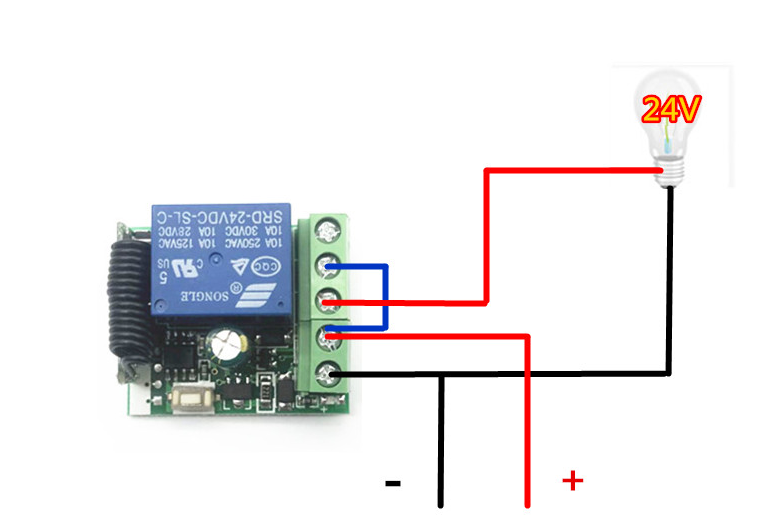
2. Wiring instructions:
1.+: Connect the positive pole of the 24V power supply;
2.-: Connect the negative pole of the 24V power supply;
3.NO: output terminal; normally open terminal of relay;
4. COM: output terminal; common terminal of relay;
5. NC: output terminal; normally closed terminal of the relay;
3. Clear data:
After pressing the learning button on the control panel eight times in a row, all the remote controllers that have learned the code matching will be automatically cleared. After clearing, the remote control that has learned the code matching will no longer be controlled.
4. Explanation of output mode:
1. "Self-locking": Press the same remote control button, press the relay to turn on, and press the relay to turn off
2. "Interlock": Press the remote control A button to open the relay, press the remote control B button to close the relay
3. "Jog": Press the A button on the remote control to turn on the relay, release the A button on the remote control, and the relay off. If you keep pressing the A button on the remote control, the relay keeps on. When will you release the remote control? When does the relay turn off
Five, matters needing attention:
1. Do not operate with power, turn off the power to operate, and power on after the test is confirmed to be correct.
2. When the remote control voltage is insufficient, please replace the battery in time (when the remote control battery voltage is insufficient, the remote control distance will generally become shorter).
3. When using wireless electronic products, pay attention to avoiding metal masks, in-type electronic devices, electromagnetic fields, etc., which have strong interference sources, and avoid short distance between the remote control and receiving, or failure to work normally.
4. Do not use this electronic product abnormally, it will reduce the performance and life of the product, and it will damage the product in severe cases and bring hidden dangers to your safety.

Ships within 48 hours · Estimated delivery Jul 3 - Jul 8
US$40
Get nowSign up to your membership to get coupons up to
15%
Get nowOpportunity to enjoy order discount up to 15% off
Top-Converting Item to Boost Your Average Order


